
Scheduling & the schedule gates
Schedules are powerful precisely because they run unattended, so a deployment gets
to decide who may change them at runtime. Two independent, off-by-default gates
govern that; neither one stops a schedule you’ve declared in project.yaml from
firing.
The one thing that’s never gated
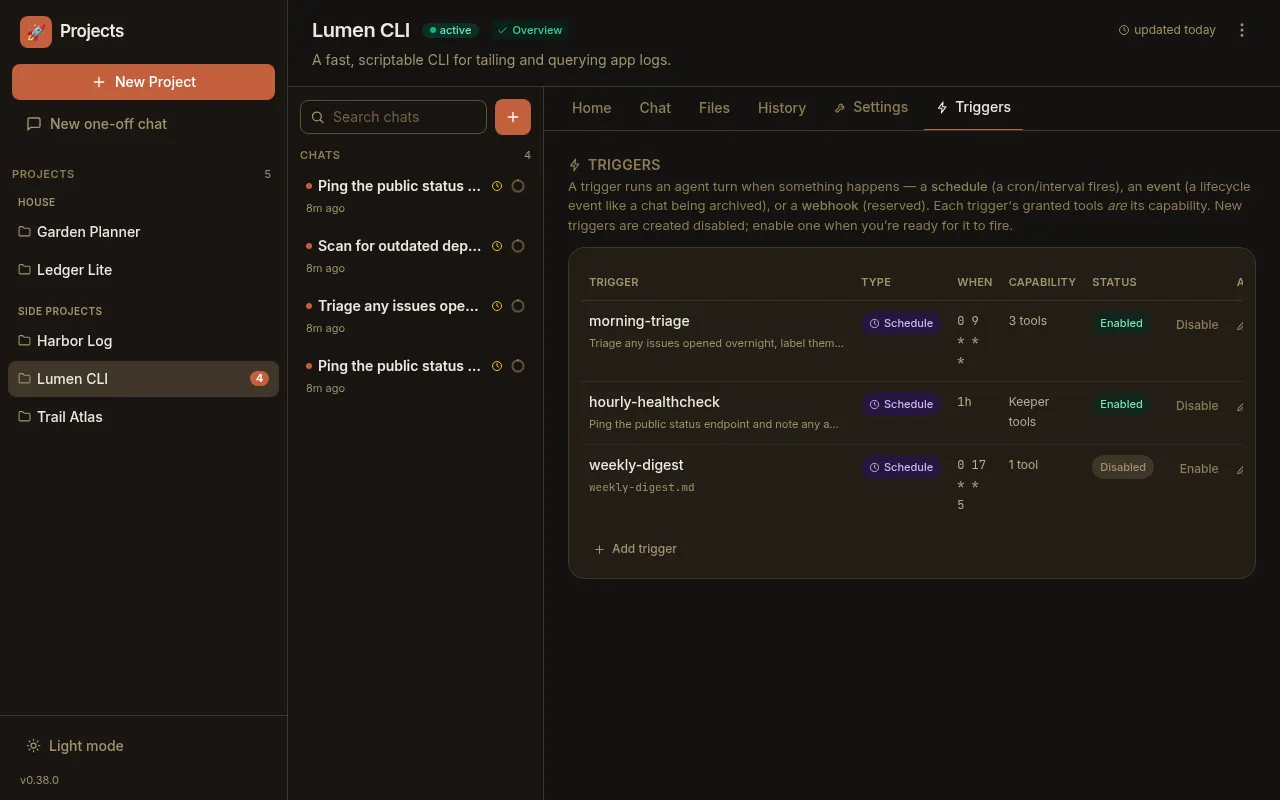
Section titled “The one thing that’s never gated”A schedule written into a project’s project.yaml is always armed — it’s the
source of truth, re-armed from the file on every restart. The gates below only
govern mutating schedules programmatically at runtime (via the older REST
API or the self-MCP tools). If you hand-edit project.yaml, or use the per-project
Triggers tab, no gate stands in your way:
The schedule-mutation gate
Section titled “The schedule-mutation gate”A single per-deployment flag, off by default:
| Setting | Env var | Default | What it does |
|---|---|---|---|
scheduleMutationEnabled | PADDOCK_SCHEDULE_MUTATION | false (OFF) | Construct herdctl’s fleet manager with allowScheduleMutation, permitting herdctl’s own runtime schedule add/remove APIs. Off, they throw. |
The variable accepts 1 / true / yes (case-insensitive) for on. In a YAML
instance-config file it’s the same key:
# instance configscheduleMutationEnabled: true# or via the environmentPADDOCK_SCHEDULE_MUTATION=1Self-scheduling from a chat
Section titled “Self-scheduling from a chat”For a keeper to schedule itself from a conversation (the
manager-agent pattern),
it needs the schedule-management MCP tools — set_trigger, list_triggers,
remove_trigger, run_trigger. These ride on Paddock’s self-management MCP layer, so they only
appear when all of the following are on — and each is off by default:
| Setting | Env var | Default | What it does |
|---|---|---|---|
selfMcpEnabled | PADDOCK_SELF_MCP | false (OFF) | Hand keepers the self-management MCP (read tools). The base layer everything else rides on. |
selfMcpWriteEnabled | PADDOCK_SELF_MCP_WRITE | false (OFF) | Add the write tools (create/fork/message — the ones that start real turns). Only honored when PADDOCK_SELF_MCP is also on. |
hooksMcpEnabled | PADDOCK_HOOKS_MCP | false (OFF) | On top of the write layer, include the trigger-management tools (set_trigger / list_triggers / remove_trigger / run_trigger), which manage schedules and event hooks. A per-project hooksMcpEnabled override wins over the instance default. |
All three accept 1 / true / yes. Because the trigger tools live on the
self-MCP write server, PADDOCK_HOOKS_MCP on its own does nothing unless the
self-MCP write layer is also enabled. When any prerequisite is off, the tools are
simply absent from the keeper — not present-but-refusing — so a keeper on a
plain deployment can’t self-schedule at all.
# instance-wide: the self-MCP write layer + the trigger tools on top of itPADDOCK_SELF_MCP=1PADDOCK_SELF_MCP_WRITE=1PADDOCK_HOOKS_MCP=1# project.yaml — scope trigger management to one project (write layer still required)hooksMcpEnabled: trueWhere these fit
Section titled “Where these fit”Both gates follow Paddock’s usual precedence — built-in default → YAML instance
file → environment variable, with a per-project override on top where one exists
(hooksMcpEnabled). See Environment variables for
the full list of instance settings.
Next steps
Section titled “Next steps”- Schedules — the concept behind cron/interval schedules.
- Scheduling recurring work — creating and managing schedules in the UI and from a chat.
- Schedules reference — the trigger schema, the self-MCP tools, and the REST endpoints these gates govern.