
Config file (YAML)
Paddock has always been configured from the environment (every PADDOCK_*
variable is listed here). As the number of knobs
grew, so did the length of the -e FOO=bar list on the run command. Since
v0.31 you can instead keep an instance’s settings in a single YAML file
— and every environment variable still wins over it, so you can override one
value at run time without rewriting the file.
This page covers the file: where it lives, how it layers with the environment,
and a realistic example. It documents the same loader as the env-var page
(packages/server/src/config.ts), so the two are two views of one config.
Precedence: file < env, defaults beneath both
Section titled “Precedence: file < env, defaults beneath both”There is one resolution order, from lowest to highest priority:
- Built-in defaults — the floor. Every setting has a sane default baked into
the code (e.g.
PORT→4000,auth.mode→none). - The YAML file — overrides the defaults. This is the base layer: each file value is threaded in as the fallback beneath the matching environment read.
- Environment variables — override the file. A
PADDOCK_*(or plain, e.g.PORT) env var always wins over the file value it shadows.
So the mental model is defaults < file < env. An env-only deployment is completely unaffected: with no file present, resolution is byte-for-byte the behaviour it had before the loader existed. You can adopt the file gradually — move your stable settings into it and keep using env vars for the one or two you tweak per run.
Where the file lives
Section titled “Where the file lives”Paddock looks for the file in one of two places:
PADDOCK_CONFIG— if this env var is set, it’s an explicit path to the file (wins over the default location).- Otherwise
<PADDOCK_DATA_DIR>/paddock.config.yaml— the default location, under your data directory (which defaults to./data).
The file is entirely optional:
- No file → no-op. If the default file doesn’t exist, Paddock runs env-only, exactly as before. Existing installs need change nothing.
- A missing explicit file is an error. If
PADDOCK_CONFIGpoints at a path that doesn’t exist, that’s treated as a misconfiguration — startup fails with a clear error rather than silently ignoring your intent. - A malformed file is an error. Unparseable YAML, or a top-level list/scalar where a mapping is expected, fails startup with a clear message rather than booting with a half-empty config.
- Empty sections are ignored, not fatal. An empty file (or a comments-only
one) is treated as “no overrides”. A valueless key (
brand:with nothing after it) is dropped, so that section falls back to env/defaults instead of crashing. - Unknown keys are ignored. This leaves room for the schedule and hook declarations that share this file to be added without breaking older builds.
An example config file
Section titled “An example config file”Keys mirror the resolved config: top-level scalars plus a few nested sections.
Every value below is optional and overridable by its matching env var. This is
the same YAML house style as project.yaml and the generated herdctl.yaml.
# <PADDOCK_DATA_DIR>/paddock.config.yaml# A home-lab instance. Every value here is overridable by its env var.
# --- Core ---port: 4000host: 0.0.0.0logLevel: info
# --- Keeper behaviour ---keeperDriveMode: session      # session enables cross-turn autonomy (ScheduleWakeup / /loop)nativeSystemPrompt: true      # use the native Claude Code prompt + CLAUDE.md hierarchy
# --- Authentication (see the Authentication page for modes) ---auth:  mode: jwt  jwksUrl: https://idp.example.com/application/o/paddock/jwks/  jwtIssuer: https://idp.example.com/application/o/paddock/
# --- Per-instance branding (tell several instances apart) ---brand:  name: Homelab  logo: "🏠"  accent: "#3c6ec2"
# --- Capabilities & safety gates (default OFF; maxSpawnDepth defaults to 1) ---selfMcpEnabled: true          # read-only self-management MCP for keepersselfMcpWriteEnabled: true     # + the write tools (create/fork/send/archive/fan-out)selfMcpProjectsEnabled: false # + create_project (provisions a project, clones a repo)maxSpawnDepth: 1              # how deep spawned children may themselves spawnscheduleMutationEnabled: falsehooksMcpEnabled: false        # + the trigger tools (list/set/remove/run_trigger)
# --- External Management API (/mcp) — file-only, no env equivalent ---managementApi:  instanceId: my-paddock                    # binds `pdk_<instanceId>_…` tokens here  publicUrl: https://paddock.example.com    # required once `clients` is set  clients:    my-laptop:      auth:        ref: env:PADDOCK_MCP_TOKEN_MY_LAPTOP  # env reference ONLY — inline is an error      # omit `scope` for the read-only default
# --- Inbound composer attachments (file/image upload; all optional) ---attachments:  enabled: true                 # master switch (default on)  maxFileSizeMb: 25             # per-file cap  maxFilesPerMessage: 10        # per-message cap  allowedTypes: ["*"]           # a real array here (env is comma-separated)
# --- Voice dictation (Whisper), git author, GitHub OAuth ---transcription:  mode: remote  endpoint: https://whisper.example.com/v1gitAuthor:  name: Paddock  email: paddock@localhost
Point Paddock at a file in a non-default place with PADDOCK_CONFIG:
PADDOCK_CONFIG=/etc/paddock/instance.yaml node packages/server/dist/index.jsCapability & safety gates worth setting here
Section titled “Capability & safety gates worth setting here”Several of the knobs above are capability gates that default to off — a plain instance advertises none of them, and you opt in per instance. They are prime candidates for the config file because they rarely change between runs. Each is settable either in the YAML or via its env var (env wins), and several also take a per-project override that wins at dispatch time.
The first four rows decide which of the fourteen mcp__paddock_manage__* tools a
keeper is handed; the
self-management MCP reference lists every tool, its
arguments and the exact gating matrix.
| YAML key | Env var | Default | What it gates |
|---|---|---|---|
selfMcpEnabled | PADDOCK_SELF_MCP | false | Give keepers the read-only self-management MCP (mcp__paddock_manage__*): list_projects, list_chats, read_chat. |
selfMcpWriteEnabled | PADDOCK_SELF_MCP_WRITE | false | Add the self-management write tools: create_chat, fork_chat, send_message, archive_chat, unarchive_chat, fork_chat_batch. Only honoured when selfMcpEnabled is also on — write implies read. (The trigger tools are gated separately, by hooksMcpEnabled below.) |
selfMcpProjectsEnabled | PADDOCK_SELF_MCP_PROJECTS | false | Add the self-management project tool (create_project) — a keeper provisioning a whole new project, cloning a repo when repo-backed. Only honoured when selfMcpWriteEnabled (and so selfMcpEnabled) is also on. Its own flag because it creates instance-level state and clones a caller-supplied URL; when off the tool is absent, not present-but-refusing. |
maxSpawnDepth | PADDOCK_MAX_SPAWN_DEPTH | 1 | How deep a spawned chat may itself spawn: a server-initiated turn at depth d gets the self-MCP only if d ≤ maxSpawnDepth. 0 restores “no spawned child gets it”; valid values are 0–8. A human turn is the depth-0 root and is never depth-gated. A per-project override wins at dispatch. |
scheduleMutationEnabled | PADDOCK_SCHEDULE_MUTATION | false | Construct herdctl’s fleet manager with allowScheduleMutation, permitting its runtime schedule add/remove APIs; off (the default) makes them throw. It is not what gates the self-MCP trigger tools (that’s hooksMcpEnabled), and triggers declared in project.yaml are armed regardless. |
hooksMcpEnabled | PADDOCK_HOOKS_MCP | false | Advertise the unified trigger-management MCP tools — list_triggers, set_trigger, remove_trigger, run_trigger. (There are no list_hooks/set_hook/remove_hook tools; Epic T collapsed the separate hook and schedule verbs into this one family, and kept this flag as their gate.) Only honoured alongside the self-MCP write tools; a per-project hooksMcpEnabled override wins at dispatch. |
managementApi — the one file-only block
Section titled “managementApi — the one file-only block”The external Management API is configured only here. There
is no PADDOCK_MANAGEMENT_* environment equivalent, because a list of clients
each with its own scope doesn’t express well as a scalar.
The one thing that never goes in this file is the token itself. This file is
git-tracked (and editable from the instance Settings screen), so a client’s
credential is given as an environment reference — auth: { ref: "env:VAR" } —
and an inline token:/secret: is a hard config error, not a warning.
The block fails closed in both directions: /mcp returns 404 until both
clients and publicUrl are set, and a client whose referenced variable is
unset, blank, or under 24 characters is dropped with a warning rather than
weakening the gate. A client with no scope gets read-only — any write scope
can start keeper turns, and a keeper has Bash. The
Management API reference has the full schema,
the scope grammar and a worked example.
For the full list of settings — auth headers, Whisper models, recovery knobs,
dev-server advertising, and more — see the
Environment variables reference; every
PADDOCK_* server setting there has a matching YAML key. (The runtime
credentials — CLAUDE_CODE_OAUTH_TOKEN / ANTHROPIC_API_KEY — and the Vite
web-build variables are read straight from the environment and have no file key.)
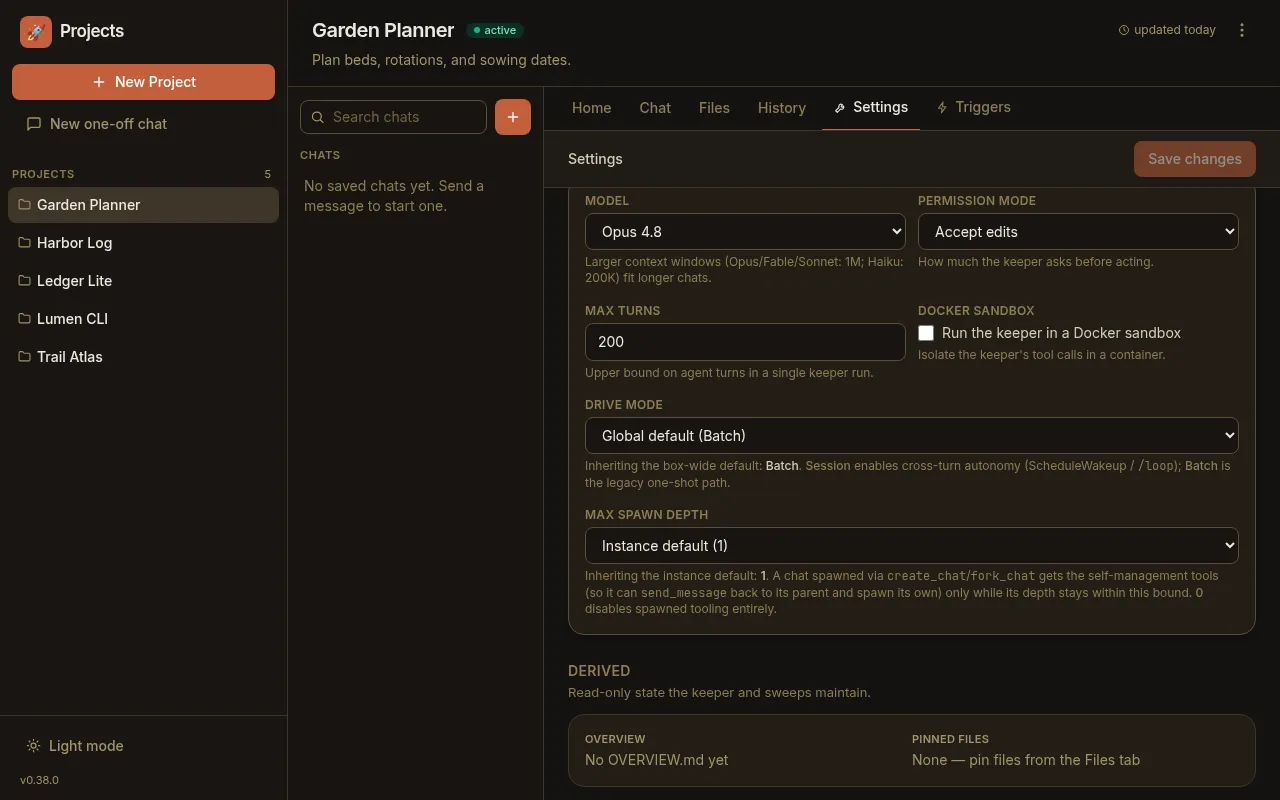
Per-project overrides layer on top
Section titled “Per-project overrides layer on top”The YAML file sets instance-wide defaults. A handful of settings can then be
overridden per project from that project’s Settings tab (persisted in its
project.yaml), which wins at dispatch time — for example driveMode,
maxSpawnDepth, hooksMcpEnabled, the keeper-chat recovery knobs, and the
attachments group (a project can raise/lower its upload caps or disable uploads
entirely). So the layering is: built-in default → instance YAML/env → per-project
override.
See also
Section titled “See also”- Environment variables — the canonical list of every setting, with defaults, that this file mirrors.
- Authentication — auth modes and the
authsection in detail. - Keeper-chat recovery — the
recoverysection and its per-project override.