
Provenance: who did what
Not every turn in Paddock is typed by a human. A chat can be started by a schedule firing on cron, or spawned by another chat that fanned out work; a message can be injected into an already-open chat by a schedule or by a sibling chat reporting back. In the UI these look identical to something you did yourself — so Paddock records provenance: who or what caused each chat, and each machine-added turn, to exist.
This page explains the model. To see the tool-level detail of what a keeper did once a chat is running, see Reading a keeper’s work.
The provenance marker: origin + depth
Section titled “The provenance marker: origin + depth”Every server-initiated turn carries a small marker. Two fields are always present:
origin— how the chat came to exist:human,scheduled,spawned, orhook.depth— how many spawn hops it is from the human (or scheduled) root of its tree. A human-started chat isdepth: 0; a chat it spawns isdepth: 1; that child’s own children aredepth: 2; and so on.
Two more appear when the chat has an identifiable parent —
parentSessionId and parentProject, naming that chat. depth says
how far a chat is from its root; these say which chat it came from, and
that’s what lets the sidebar draw the tree
(below).
So a human-started chat is { origin: human, depth: 0 } — the root of any
fan-out tree. A chat a keeper creates with a self-management tool becomes
{ origin: spawned, depth: parent.depth + 1 }, and a cron-fired chat is
{ origin: scheduled, depth: 0 } — a schedule is a root trigger, just like a
human.
The marker is stamped once, at chat creation, and is never overwritten by a
later turn. Resuming, waking, or sending a message into an existing chat leaves
its recorded provenance intact — provenance describes how a chat was born, not
what last happened in it. It’s persisted in a per-chat server sidecar
(RunProvenanceStore), the same durable side-metadata pattern Paddock uses for a
chat’s archived flag and your read state.
Chat-list badges
Section titled “Chat-list badges”The per-project chat list turns the marker into a small, subtle icon badge, so the “ran without me” chats stand out at a glance while ordinary human chats stay unadorned:
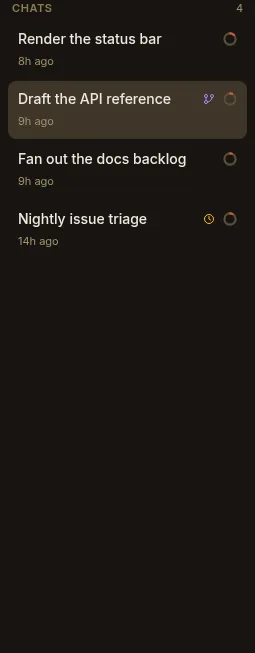
- Scheduled chats — a schedule started them — show an amber clock.
- Spawned chats — another chat created them — show a violet branch icon (with a note of how many levels deep, when it’s more than one).
- Hook chats — an event hook fired them — show a sky bolt.
- Human chats — the default — show no badge, so only the unattended runs draw the eye.
The same origin colors reappear in the project’s History tab, which lists recent runs (You / Scheduled / Spawned) so the work that happened while you were away is easy to find and open.
Per-message attribution
Section titled “Per-message attribution”A single chat can interleave turns you typed with turns a machine injected — a schedule firing into the chat it owns, or a sibling chat sending a message. So provenance also works at the per-message level: a machine-injected user turn gets a subtle attribution line above its bubble, while your own messages stay unlabelled (the quiet default).
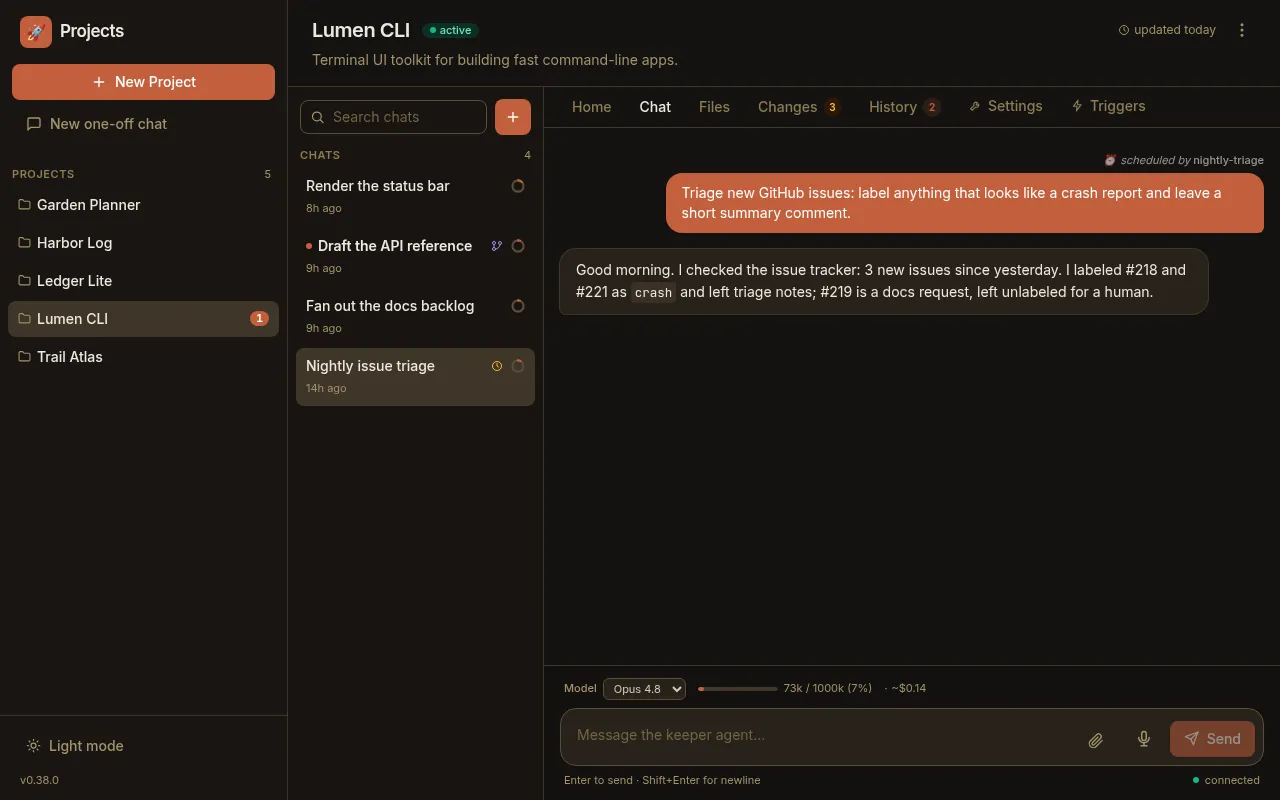
The wording names the source:
- ⏰ scheduled by ⟨name⟩ — a schedule fire injected the turn.
- ↩ sent by ⟨chat⟩ — another chat sent it; the chat name is a link straight to the sender.
- ⚡ triggered by hook ⟨name⟩ — an event hook fired it.
- ⚠ continued after a background task was terminated — Paddock’s keeper-chat recovery nudged the turn.
Under the hood this is a separate sidecar (MessageProvenanceStore) that records,
per chat, an ordered list of injections with their sender and the exact text
injected; at render time Paddock matches each machine-injected message to the next
recorded injection. Because the injected prompt lands verbatim as the message
content, the match is stable — and a human-typed message never matches, so it’s
never mislabelled.
Injected turns stream in live
Section titled “Injected turns stream in live”Attribution isn’t only a history feature. When a message is injected into a chat you already have open, it now streams in immediately over the WebSocket — you see the incoming turn and its attribution appear in place, rather than only the reply showing up and having to refresh to learn where it came from.
From badge to structure
Section titled “From badge to structure”Provenance used to only decorate the chat list. It now shapes it: a chat with a recorded parent is drawn nested underneath that parent, so a keeper’s fan-out reads as one foldable family instead of a wall of sibling rows. The chat-list guide covers what that looks like; this is where the edge comes from.
Paddock resolves each chat’s parent in two tiers, in this order:
- The recorded edge.
parentSessionId+parentProjecton the chat’s own provenance marker, written when the chat was created. Authoritative. - An inferred edge. Failing that, Paddock looks at the chat’s message provenance and takes the first turn injected by another chat — because a spawned chat’s kickoff prompt is injected by whoever spawned it. This is a best guess, not a recorded fact.
Tier 2 exists because tier 1 is new. There is no migration: chats created before nesting shipped have no recorded parent and never will, so the inference is what recovers most of their lineage at read time. It recovers a lot, but not everything — a chat forked with no kickoff prompt injected nothing into its child, so there is no signal at all and that child stays a permanent root.
Which paths record a parent:
| How the chat was created | Parent recorded? | Where it lands |
|---|---|---|
A keeper forks a chat (fork_chat, or the UI’s Fork) | Yes | Under the chat it was forked from — not under whoever ran the tool |
A keeper spawns a chat (create_chat) | Inferred | Under the chat that spawned it |
| You start a new chat | No | A root, correctly |
| A schedule or an event hook fires one | No | A root — a trigger is its own origin, not a child |
An external MCP client calls create_chat over /mcp | No | A root — the caller isn’t a chat, so there’s nothing to nest under |
Why it matters
Section titled “Why it matters”As keepers do more unattended work — scheduled triage, a manager chat fanning out sub-tasks, hooks reacting to events — a project’s chat list stops being purely “conversations I had.” Provenance keeps it legible: at a glance you can tell your own threads from the ones that ran on a timer or were spawned by another chat, and within a chat you can tell which turns a machine added. It’s the connective tissue that makes autonomous work reviewable instead of mysterious.
Next steps
Section titled “Next steps”- Reading a keeper’s work — the tool-level view of what a chat actually did.
- Chats are sessions — what a chat is, and how forking copies one.
- The sweeper — the post-turn curation agent, itself a non-human actor.